Boomi Cloud API Management Developer Blog
RSS FeedTIBCO Mashery Local 5.3 is GA
- Upgraded Configuration Manager and Developer Portal
- Content Management System - create, modify and manage portal content
- Portal Configuration - Manage portal settings including custom footer content
- Organizations - Build hierarchies to reflect your own organizational structure; assign content and API assets to cleanly separate responsibilities across teams
- Scheduled Maintenance Events - Plan and schedule maintenance events
- An Enhanced SDK for Adapters and Processors
- APIs to access plan ID, package ID and application ID details are now part of the Mashery Local 5.3 SDK
- Mashery Local SDK based adapters can now be chained with Mashery developed and ported connectors
- Added SDK access to Memcached Objects
- Added support for remote debugging of SDK based code
- New and improved CLI commands to list bindings, review component level processes, cleanup old/removed components, and list component versions
- HTTPS and Credentials support for Elasticsearch log integrations
- Added HTTP Proxy support for the Mashery Local Installer
- Mashery Local now fully supports Kubernetes and Docker Secrets for deployment management
- An improved quick start deployment that now allows you to bootstrap a cluster with sample data for a faster end-to-end experience, along with with the ability to persist data after restarting or shutting down containers
- Interactive Content-Security-Policy editor that allows you to build a comprehensive, least-privilege content security policy, easily securing your developer portal with a rich, intuitive interface.
The product is available immediately for download on edelivery.tibco.com
TIBCO Mashery Local 5.2 is GA
- The Mashery Local Developer Portal - 100% on-premises and homegrown.
- Untethered users can now run the developer portal within their infrastructure without any external dependencies
- Reinforces TIBCO's cloud-native, anywhere and everywhere strategy to empower untethered customers with the tooling needed to support API cataloging/discovery, interaction & testing, and API consumer onboarding
- Mashery Local Logs within TIBCO Spotfire
- We've introduced a new and easy to follow process which will help customers to view and analyze their Mashery Local logs within TIBCO Spotfire
- With up-to-date data from Mashery Local, Spotfire can assist with deriving deeper and additional business insights along with customized reporting
- A new quickstart guide for getting Mashery Local up and running with one command
- Push Mashery Local to your cloud registry directly from the TML Installer, including newly introduced support for using AWS Federated accounts
- Verified platform support for AWS' EKS, PKS, and Docker Enterprise, and generated updated deployment scripts accordingly
- An updated Mashery Local Configuration Manager - Streamlined integration leveraging the Mashery Local API, with an improved UI and UX. This deployment option is no longer mutually exclusive from the Untethered_API mode for those administrators who choose to use the UI and the API for platform access
- Fine-grained controls allowing for a proxy bypass on target services
- New option to build the TML cluster with support for the Oauth2 JWT adaptor directly from within the TML installer
- Improved SDK documentation, example/starter adapters, and an improved packaging process
The product is available immediately for download on edelivery.tibco.com
TIBCO Mashery Local 5.1 is GA
We are pleased to announce that TIBCO Mashery Local 5.1.0 is Generally Available! This release continues to expand on our cloud-native initiative and includes new foundational and functional updates to improve usability today while paving the way for future enhancements as well.
- Introduction of TML API, as a new untethered deployment configuration mode for customers looking to integrate Mashery Local with their CI/CD delivery pipeline
- Improved component health and monitoring support
- Backward compatibility for Mashery Local 4.x OAuth 2 token Management
- Product maturity and resiliency updates to improve deployment and production operation
- Documentation updates and enhancements
The product is available immediately for download on edelivery.tibco.com along with detailed installation documentation
TIBCO Mashery Local 5.0 is GA
We are pleased to announce that TIBCO Mashery Local 5.0, a cloud-native API gateway, is now generally available!
- Ultimate control for customers around deployment choices
This release provides flexibility and control to our customers over where and how Mashery Local can be deployed.
The API Gateway can be configured to operate in two modes: hybrid or completely standalone.When Mashery Local is set to operate in hybrid mode, TIBCO Cloud Mashery continues to provide a single pane of glass via the centralized API Control Center for management and analytics. The API Gateway supports deployment in a customer's data center, or cloud environment, to process traffic.
When Mashery Local is set to operate in a completely standalone mode, a new Configuration Manager tool is included to configure API policies, packages, and plans and manage API keys. Customers continue to have access to improved operational intelligence and API analytics via a locally available, and real-time dedicated log service.
- Optimized for cloud-native deployments, supporting a wide variety of platforms, and orchestration stacks like Kubernetes and Swarm.
The product is available for deployment across a range of platforms: AWS, Azure, GCP and other on-premises environments supporting Kubernetes, Docker Swarm and OpenShift for orchestration tooling. A complete list of supported platforms is available in the release notes
- Flexible scaling that can tailor to desired API performance characteristics
API Gateway administration teams can flexibly manage and independently scale components that comprise the API Gateway to suit their specific API traffic profile and desired performance characteristics.
- Faster OAuth token management and synchronization in distributed, highly available environments
This release includes a significantly revamped architecture that drives performance improvements around OAuth tokens synchronization across multi data centers and globally distributed regions.
The product is available immediately for download on edelivery.tibco.com along with detailed installation documentation
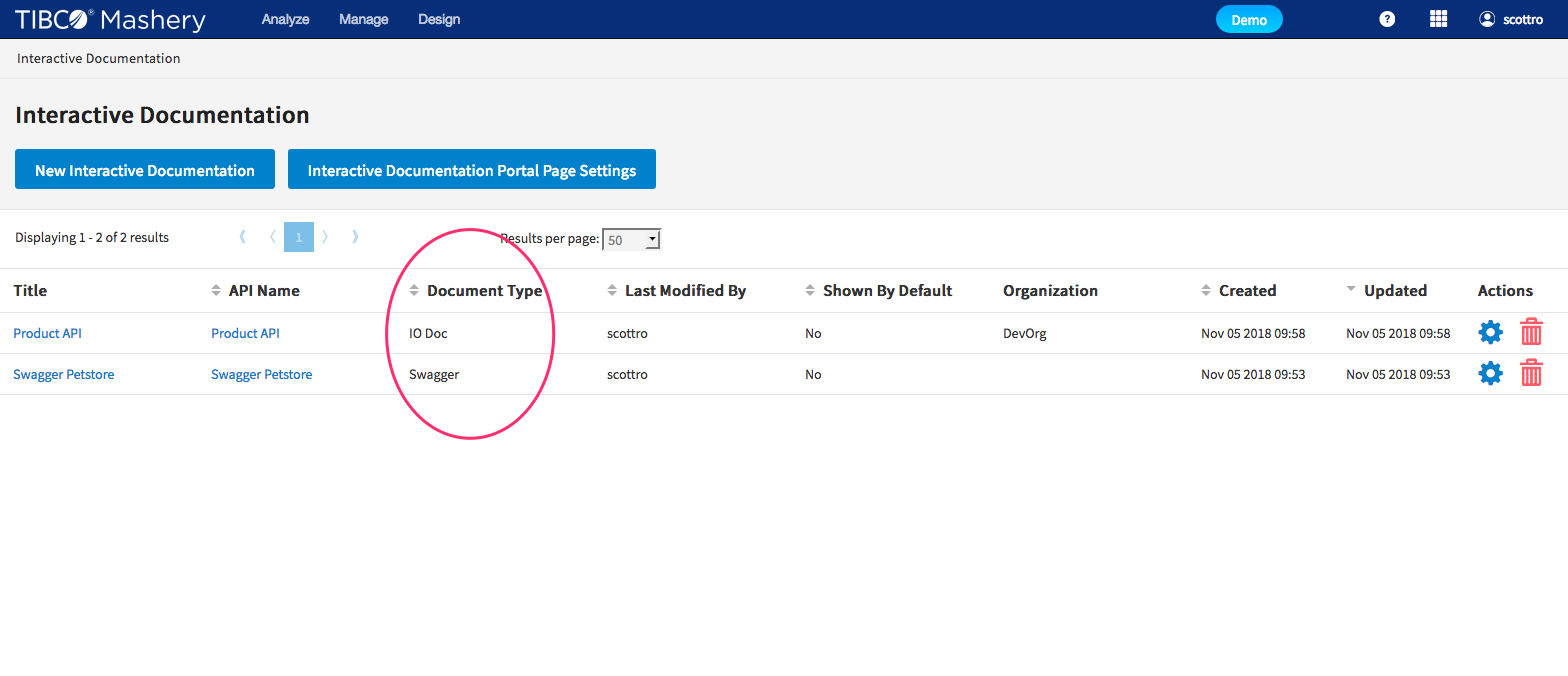
Additional Swagger/OAS Support Released
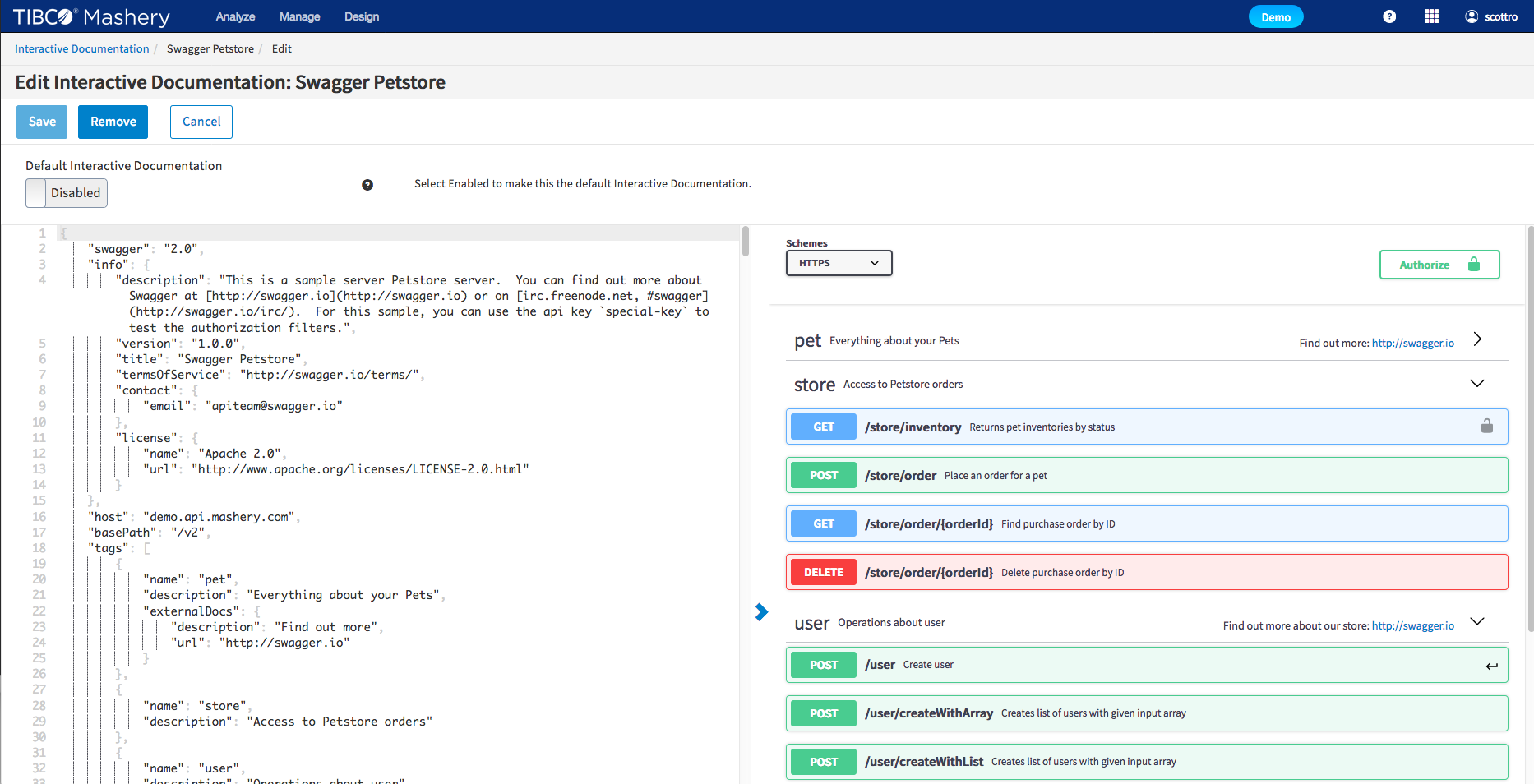
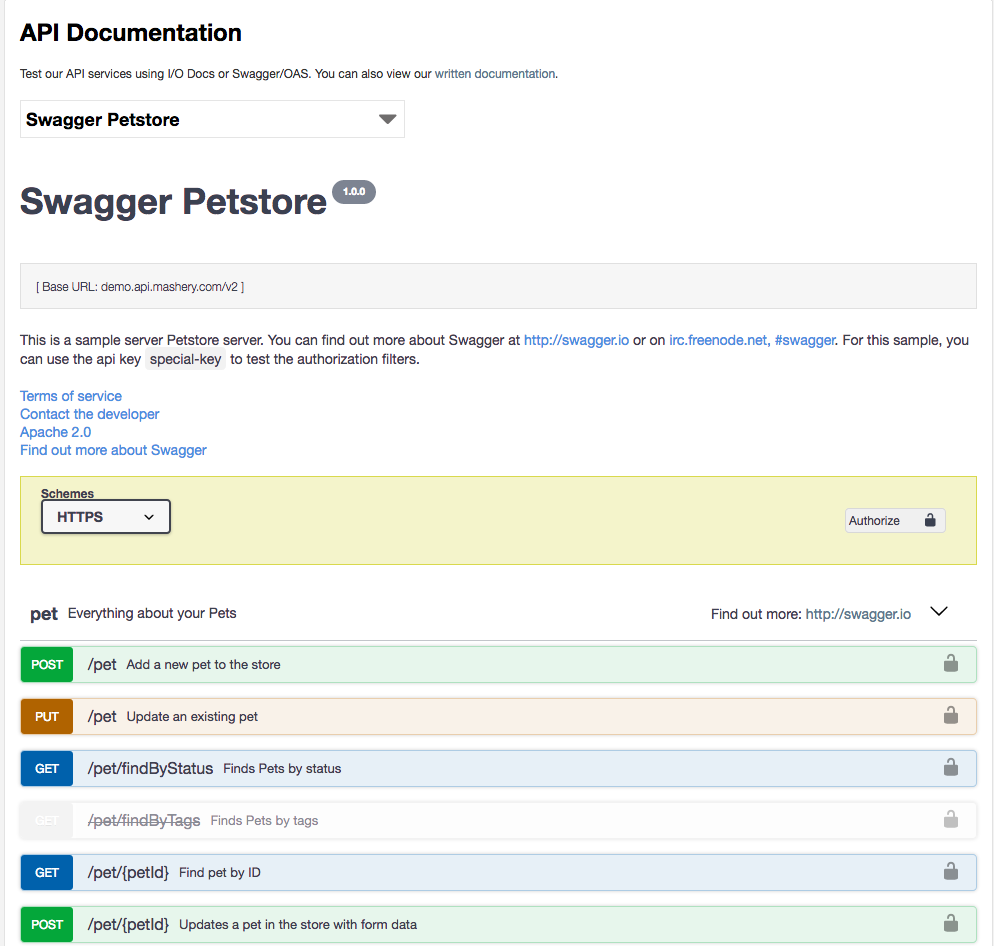
TIBCO Mashery continues to provide tools that enable modern API development and documentation practices. With our improved native Swagger/OAS support you can easily import, manage and display Swagger 2.0 and OAS 3.0.x along side Mashery's own IO Docs format.
Key features:
- You decide which API documentation format best meets your needs
- Swagger and IO docs side by side as first class citizens in Editor and Documentation
- Advanced editor including
- JSON formatting
- JSON validation
- Rendered view in editor
More information can be found in our Documentation
New Feature: Call Log Stream!
We are very pleased to announce the General Availability of the Call Log Stream feature. This unique in the market feature provides real-time, low-level transactional information about your API traffic whether you deploy our SaaS traffic manager, on-premise or in a hybrid deployment. As the ‘front door’ for your APIs, knowing what’s happening with your traffic from Mashery’s perspective is critical.
- Provides Sub-minute latency
- Combines with your own Operational dashboards and systems to get full picture of traffic health
- Enriched transaction data containing information such as package, endpoint, URI, IP address, and many more!
- WebSocket Based Streaming API
- Compliments ECLE feature
Visit the Online Documentation to enable this feature today!
Mashery Local 4.4 is GA
Mashery Local - v4.4 was made Generally Available as of last Friday.
- Improved end-to-end monitoring - provides the ability and instructions to forward Mashery Local access logs to TIBCO LogLogic. TIBCO LogLogic provides log management intelligence technology to provide end-to-end visibility and monitoring over all your applications and IT systems.
- Ability to connect to backend server via a proxy
- Expanded platform support : Mashery Local for Docker now supports installation on Red Hat® Linux without virtualization
- More admin flexibility tools for Mashery Local virtual appliance
To download this release and get access to the detailed documentation, you can visit http://edelivery.tibco.com or docs.tibco.com as usual or contact Technical Support for assistance
New Feature: API History
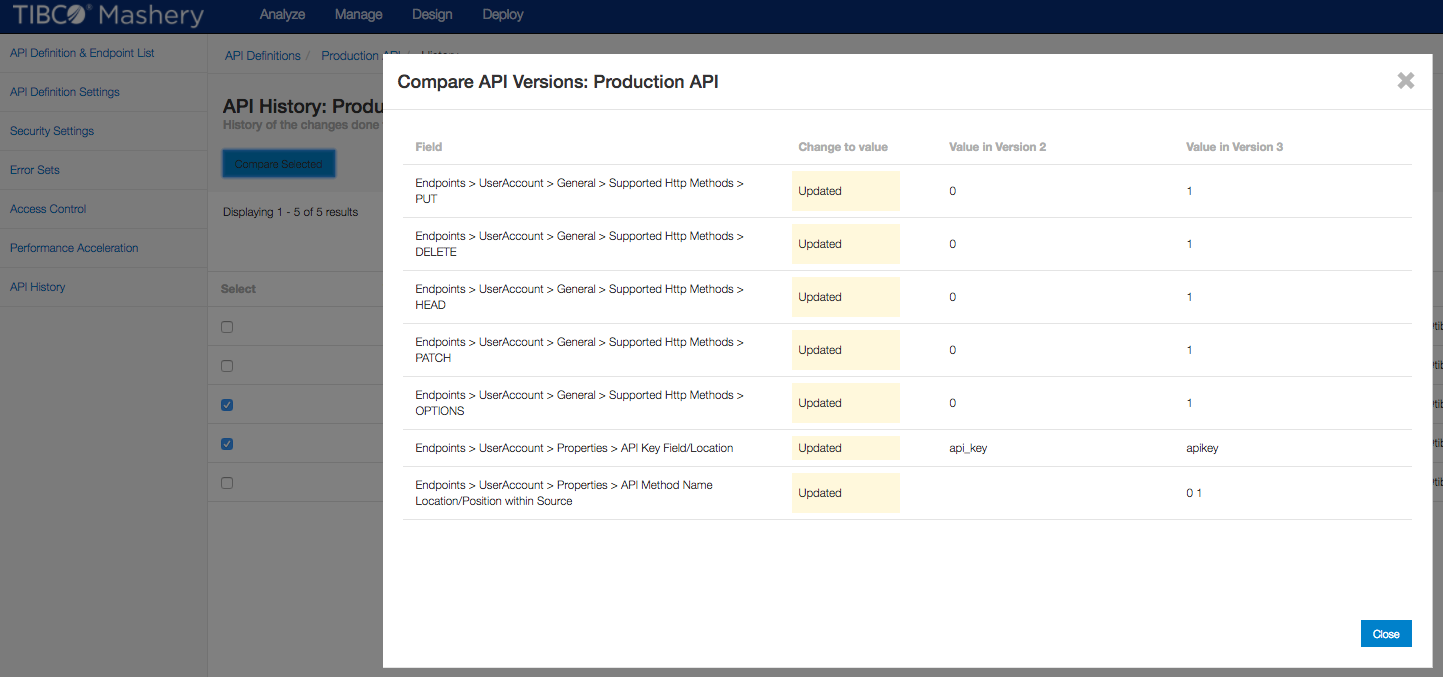
We are happy to announce that we have released a new feature this week called API History. This feature allows an Administrator to compare versions of API configurations to see what changed between versions, as well as exposes Audit information such as the time/date of incremental changes, and the username of the person who made the update.
This feature is available to all customers, and is available on the left hand navigation for API Definitions. Keep an eye out for continued iteration to this feature, as well as related Audit features coming soon!
Documentation is available at: http://docs.mashery.com/design/GUID-9E5C50DE-60CC-41FF-A802-78F064747DD8.html
Mashery Local 4.3
Mashery Local - v4.2 was made Generally Available as of last week.
- Expanded support to additional platforms - e.g. RedHat OpenShift.
- Improvements to the adapter SDK to allow override of call routing to API backend
TIBCO Cloud Mashery
TIBCO Mashery is ever evolving and we are proud to announce that TIBCO Mashery has become an intrinsic part of TIBCO Cloud. TIBCO Cloud Mashery is the next step in bringing all of the TIBCO Cloud offerings closer together, giving you, as our customer, a one stop shop for all Software as a Service offerings from TIBCO.
Our existing Mashery customers will not see this at first, since we are hard at work to ensure that their transition to this new platform is seamless. All our new customers will onboard via TIBCO Cloud, to access, sign up now for our free trial here.
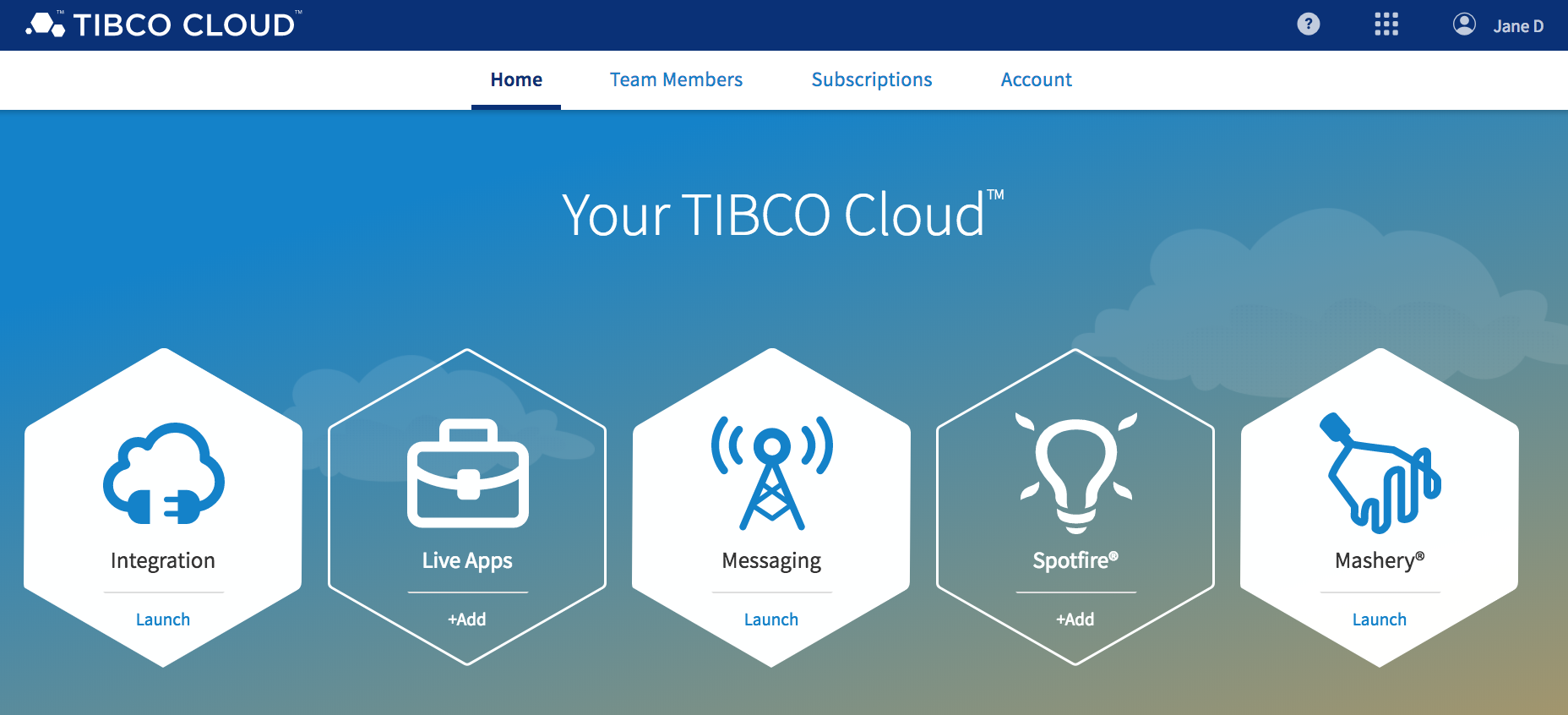
As you can see above, TIBCO Cloud comes with not only TIBCO Cloud Mashery, but also allows you to try and use the following products:
- TIBCO Cloud Integration - Wherever your applications and APIs are, use your browser to quickly and easily connect to them.
- TIBCO Cloud Live Apps - Rapidly create and deliver smart business apps with an intuitive and easy to use low-code platform.
- TIBCO Cloud Messaging - High performing web and mobile apps require real-time exchange of information―exactly what TIBCO Cloud™ Messaging provides.
- TIBCO Cloud Spotfire - A cloud analytics software-as-a-service platform designed for data visualization and discovery. Everything you need is available on the cloud — no installation, just analytics.
TIBCO Cloud is the one stop shop for all customers using TIBCO's software-as-a-service offerings, and Mashery is now an integral aspect!
[ Page 1 of 12 | Next ]